![LH-2025-Logos-15.png]](https://help.tryletterhead.com/hs-fs/hubfs/LH-2025-Logos-15.png?height=31&name=LH-2025-Logos-15.png)
Overview
HTML Promotions enables Company Admins to add, schedule, and manage ad tags and custom creatives as a dedicated "HTML" promotion type. This feature has the same workflow, permissions, and reporting already in use for Global Promotions. This unlocks better control over all revenue streams from one central location, and makes it easier to integrate ad networks, sponsored widgets, and other third-party experiences into newsletters in a consistent, trackable way.
Who Can Do What
- Company Admins – Just like for all other Global Promotions, this role controls company-wide HTML promotions. Once a custom HTML promotion has been created and activated, the Company Admin can:
-
-
Add custom HTML (such as programmatic ads, sponsored widgets, or third-party ad tags) as a promotion that can be assigned to channels.
- Schedule and insert HTML promotions into newsletters using the existing company promotions workflow
- Maintain full control of all revenue streams from one place
-
-
-
All other roles - After an Admin has set up promotions, Organization and channel Admins can:
- Add promotion blocks to any newsletter or template
- Select the correct zone so the right content appears
Setting Up an HTML Promotion
-
Go to Company → Promotions
-
Click Create Campaign
-
Enter all campaign details:
-
Title and Promoter name
-
Channels (which newsletters will run this promotion)
- Zone (Specify where in the newsletter layout this promotion will be placed)
-
Schedule (start and end dates or total days)
-
-
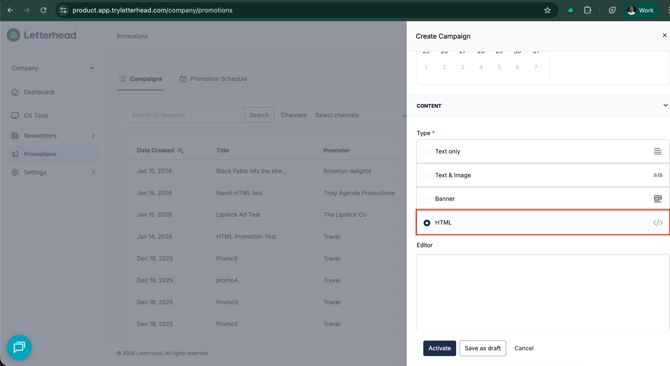
- Under Promotion Type, select HTML
-
Insert your HTML code directly into the editor field below
-
- Under Promotion Type, select HTML
-
Choose Save as Draft (to finish later) or Activate (to make it available)
-
Confirm your new promotion appears in the table with status Active
Note 💡
HTML Promotions support most of our composer style settings except heading styles.
-
Will metrics be provided for HTML Promotions?
-
Yes, the metrics will be in the promotion's details page just like any other Global Promotion
-
-
Can I see a preview of this HTML Promotion?
-
Yes, we will show a preview for the HTML promotions in the promotion details page.
-
Need Help?